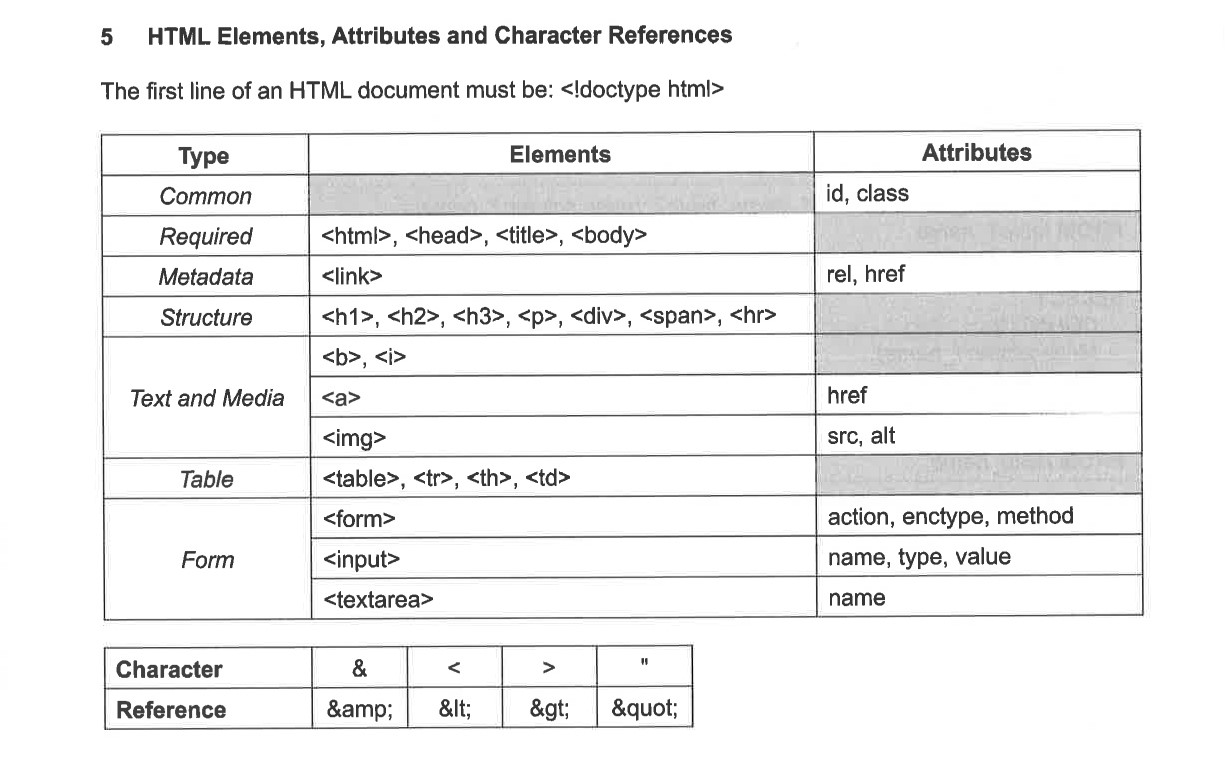
HTML Basics
This page covers the fundamental elements, tags, and attributes in HTML, along with examples for better understanding.
1. Basic Elements
<!DOCTYPE html>: Declares the type and version of the document (HTML5).<html>: Root element of the document, contains all HTML content.<head>: Contains metadata and links to external resources.<title>: Specifies the document's title, displayed in the browser tab.<body>: Contains all visible content of the webpage.
<!DOCTYPE html>
<html>
<head>
<title>My First Webpage</title>
</head>
<body>
<h1>Welcome to HTML</h1>
</body>
</html>
---------------------------------------
Welcome to HTML
2. Headings
- HTML provides six levels of headings, from
<h1>(largest) to<h6>(smallest).
<h1>Main Heading</h1>
<h2>Subheading</h2>
<h3>Section Heading</h3>
---------------------------------------
Main Heading
Subheading
Section Heading
3. Text Formatting
<p>: Defines a paragraph.<b>: Bold text.<i>: Italicized text.<u>: Underlined text.<br>: Line break.<hr>: Horizontal line.
<p>This is a paragraph.</p>
<b>This text is bold.</b><br>
<i>This text is italicized.</i><br>
<u>This text is underlined.</u><br>
Break between<br>the text<br>
Horizontal line between<hr>the text
---------------------------------------
the text Horizontal line between
the text
This is a paragraph.
This text is bold. This text is italicized. This text is underlined. Break betweenthe text Horizontal line between
the text
4. Lists
<ul>: Creates an unordered list.<ol>: Creates an ordered list.<li>: Defines a list item.
<ul>
<li>Item 1</li>
<li>Item 2</li>
</ul>
<ol>
<li>First</li>
<li>Second</li>
</ol>
---------------------------------------
- Item 1
- Item 2
- First
- Second
5. Tables
<table>: Defines a table.<th>: Table header cell.<tr>: Table row.<td>: Table data cell.- To get a border and change the colours in table check out Table CSS
<ul>
<li><code><table></code>: Defines a table.</li>
<li><code><th></code>: Table header cell.</li>
<li><code><tr></code>: Table row.</li>
<li><code><td></code>: Table data cell.</li>
</ul>
---------------------------------------
| Subject | Grade |
|---|---|
| Math | A |
| Science | B |
6. Images & Hyperlinks
Images
<img>: Displays an image.- Attributes:
src: Path to the image file.alt: Alternate text if the image cannot be displayed.
<img src="Fake.jpg" alt="Image does not exist"><br>
<img src="https://cdn.avero-tech.com/asrjc/img/logo.png" alt="ASRJC Portal"><br>
<img src="{{ url_for('static', filename='HelloWorld.jpg') }}" alt="Hello World">
---------------------------------------



Hyperlinks
<a>: Creates a hyperlink.- Attributes:
href: URL or file path for the link destination.
<a href="{{ url_for('CSS') }}">Go to CSS Page</a>
<a href="https://www.google.com">Visit Google</a>
---------------------------------------
Go to CSS Page
Visit Google
7. Forms
<form>: Creates a form for user input.- Input types:
text: Single-line text field.checkbox: Checkbox input.radio: Radio button input.file: File upload field.submit: Submit button.
<form action="/submit" method="POST">
<label for="name">Name:</label>
<input type="text" id="name" name="name">
<br>
<label for="House">Choose a House:</label>
<select name="House" id="House">
<option value="Artemis">Artemis</option>
<option value="Helios">Helios</option>
<option value="Poseidon">Poseidon</option>
<option value="Athena">Athena</option>
</select>
<br>
<label>Choose your favorite programming language:</label>
<input type="radio" id="python" name="language" value="Python">
<label for="python">Python</label>
<input type="radio" id="javascript" name="language" value="JavaScript">
<label for="javascript">JavaScript</label>
<input type="radio" id="java" name="language" value="Java">
<label for="java">Java</label>
<br>
<label>Select your hobbies:</label>
<input type="checkbox" id="reading" name="hobby" value="Reading">
<label for="reading">Reading</label>
<input type="checkbox" id="traveling" name="hobby" value="Traveling">
<label for="traveling">Traveling</label>
<input type="checkbox" id="gaming" name="hobby" value="Gaming">
<label for="gaming">Gaming</label>
<br>
<label>Upload your profile picture:</label>
<input type="file" id="profile-pic" name="profile-pic">
<br>
<input type="submit" value="Submit">
</form>
---------------------------------------
8. Special Characters
<:<>:>&:&":"':'{:{}:}
9. Refering to Insert
This insert is provided during your exams and do use it only for reference