CSS Basics
Cascading Style Sheets (CSS) allow you to style and format HTML elements. Here's a detailed guide with dark-boxs:
1. Linking an External Style Sheet
To apply styles from an external CSS file, use the <link> tag inside the <head> element:
2. CSS Syntax
The basic structure of CSS involves selecting an element and defining its style properties:
- color: Sets the text color.
- font-size: Specifies the size of the text.
3. Basic CSS Properties
- color: Sets the text color.
- font-size: Specifies the font size.
- font-weight: Sets the boldness of text.
- font-family: Specifies the font style.
- text-align: Aligns text horizontally.
- border: Defines border style, color, and width.
- margin: Sets the space outside an element.
- padding: Sets the space inside an element.
4. Classes and IDs
Classes and IDs help target specific elements for styling:
About Me
I enjoy coding.
Good morning.
Good afternoon.
5. Descendant Selectors
Style elements based on their nesting structure:
Hello
Goodbye
In this dark-box, div p targets paragraphs inside a <div>, while p applies to all other paragraphs.
6. CSS for Tables
Using CSS, you can make tables visually appealing by customizing borders, colors, padding, and more.
Table with HTML and CSS
| Subject | Grade |
|---|---|
| Math | A |
| Science | B |
Explanation:
table {}: Applies styles to all table elements.- width: 100%; The table spans the full width of its container.
- border-collapse: collapse; Borders between cells are merged.
- margin-bottom: 20px; Adds spacing below the table.
th, td {}: Applies styles to both table headers and data cells.- border: 2px solid white; Creates a solid white border around cells.
- padding: 8px; Adds padding inside cells for spacing.
- text-align: left; Aligns cell content to the left.
th {}: Adds additional styles to table headers.- background-color: magenta; Gives headers a magenta background.
- font-weight: bold; Makes header text bold.
tr {}: Styles applied to table rows.- background-color: grey; Sets a default grey background for rows.
tr:hover {}: Adds a hover effect to rows.- background-color: red; Highlights the row in red when hovered.
7. Example of a Webpage with CSS
Below is an dark-box of a complete HTML file styled with CSS:
Welcome to CSS
This paragraph is styled using a class.
This paragraph is styled using an ID.
8. Refering to Insert
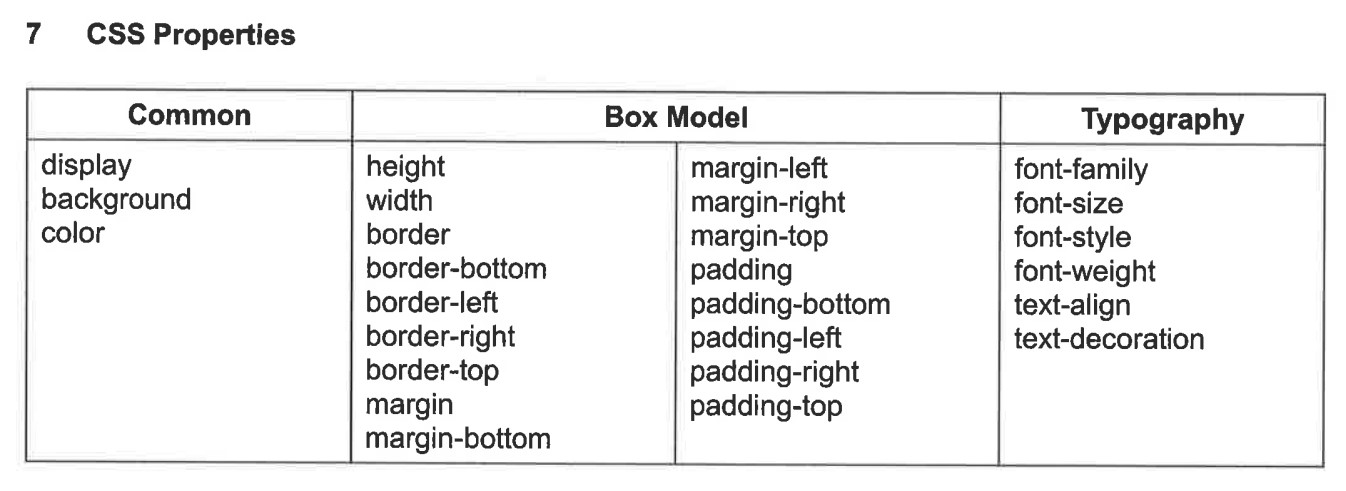
This insert is provided during your exams and do use it only for reference