SQL Workflow
1. Setting Up SQLite3 Database
The following Python code demonstrates how to set up and interact with an SQLite3 database.
# Import modules
import sqlite3

# Connect to database (or create it if it does not exist)
conn = sqlite3.connect('school.db')

# Create cursor object to interact with the database
cur = conn.cursor()

# Create table
cur.execute('''CREATE TABLE IF NOT EXISTS students(sid INTEGER PRIMARY KEY,
                       name TEXT NOT NULL,
                       classid TEXT,
                       phone TEXT UNIQUE);''')

cur.execute('''CREATE TABLE IF NOT EXISTS Teachers(tid INTEGER PRIMARY KEY,
                       tname TEXT NOT NULL,
                       subject TEXT NOT NULL,
                       classid TEXT
                       salary REAL NOT NULL);''')

cur.execute('''CREATE TABLE IF NOT EXISTS Tests(testid INTEGER PRIMARY KEY,
                       sname TEXT NOT NULL,
                       marks TEXT,
                       phone TEXT UNIQUE);''')

# Insert data
cur.execute('''INSERT INTO students (name, classid, phone)
              VALUES ('Mary', '24/14', '77777777');''')

# Update data
cur.execute("UPDATE students SET phone='12341234' WHERE sid=1;")

# Delete data
cur.execute("DELETE FROM students WHERE classid='24/11';")

# Select and display data
rows = cur.execute("SELECT * FROM students;")
for row in rows:
    print(row)

# Commit changes to disk
conn.commit()

# Close connection
conn.close()
Explanation:
- Database Connection: The `sqlite3.connect()` method connects to a database or creates it if it doesn’t exist.
- Cursor Object: The cursor object allows us to execute SQL commands.
- Create Table: `CREATE TABLE IF NOT EXISTS` ensures that the table is only created if it doesn’t already exist.
- CRUD Operations:
INSERT INTO: Adds new records to the table.UPDATE: Modifies existing records based on a condition.DELETE: Removes records based on a condition.
- SELECT Query: Retrieves data from the database.
- Commit and Close: Commits changes to disk and closes the connection.
2. SQL Select, Where, and Aggregate Functions
Select Query
cur.execute("SELECT name, classid FROM Students;")
Retrieves specific columns (`name` and `classid`) from the `Students` table.
Where Clause
cur.execute('''SELECT * FROM students WHERE classid='2512';''')
Filters rows where `classid` matches `2512`.
Order By
cur.execute('''SELECT * FROM Tests ORDER BY marks;''')
Sorts the results by the `marks` column in ascending order.
AND, OR, NOT Operators
- AND: Filters rows where all conditions are true.
- OR: Filters rows where any condition is true.
- NOT: Filters rows where the condition is false.
cur.execute('''SELECT * FROM Teachers WHERE subject = 'Math' AND salary = '8888.88';''')
cur.execute('''SELECT * FROM Teachers WHERE subject = 'Math' OR subject = 'Computing';''')
cur.execute('''SELECT * FROM Teachers WHERE NOT subject = 'Math';''')
Aggregate Functions
- MIN(): Returns the smallest value.
- MAX(): Returns the largest value.
- COUNT(): Counts rows.
- SUM(): Sums numeric values.
- AVG(): Returns the average of numeric values.
cur.execute("SELECT MIN(marks) FROM Tests;")
cur.execute("SELECT MAX(marks) FROM Tests;")
cur.execute("SELECT COUNT(*) FROM Students;")
cur.execute("SELECT SUM(salary) FROM Teachers;")
cur.execute("SELECT AVG(marks) FROM Tests;")
3. SQL Joins
INNER JOIN
The `INNER JOIN` keyword selects records that have matching values in both tables.
cur.execute('''
SELECT Students.sname, Teachers.tname, Teachers.subject
FROM Students
INNER JOIN Teachers ON Students.classid = Teachers.classid;
''')
This query retrieves student names, teacher names, and subjects where the `classid` matches in both tables.
LEFT OUTER JOIN
The `LEFT OUTER JOIN` keyword returns all records from the left table and the matching records from the right table. If no match exists, NULL values are returned for the right table’s columns.
cur.execute('''
SELECT Students.sname, Teachers.tname, Teachers.subject
FROM Students
LEFT OUTER JOIN Teachers ON Students.classid = Teachers.classid;
''')
This query retrieves all student names and their respective teachers (if any). If no teacher exists for a student’s class, NULL is returned for the teacher fields.
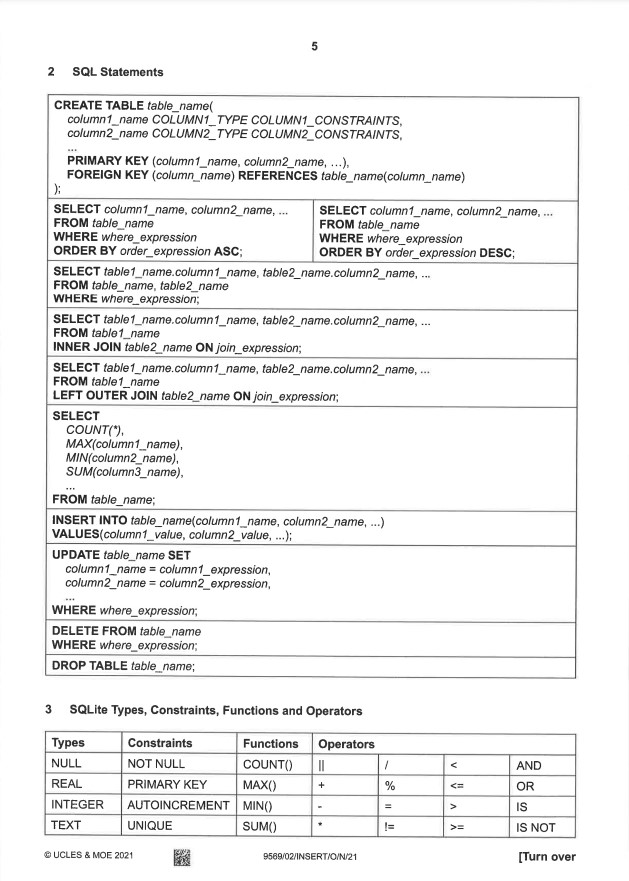
4. Refering to Insert
This insert is provided during your exams and do use it only for reference