PyMongo and MongoDB (Non-SQL)
1. Connecting to MongoDB
MongoDB is a NoSQL database that stores data in a flexible, JSON-like format. The PyMongo library allows Python to interact with MongoDB.
# Import modules
import pymongo
from pprint import pprint

# Connect to localhost MongoDB
client = pymongo.MongoClient('localhost', 27017)

# Create database
db = client['school']

# Create collections
student_coll = db['students']
teacher_coll = db['teachers']

# Display existing databases and collections
database = client.list_database_names()
print(database)

coll_name = db.list_collection_names()
print(coll_name)
Explanation:
MongoClient(): Connects to MongoDB running on localhost at port 27017.- Creates a database
schooland two collections:studentsandteachers. list_database_names(): Lists all databases in MongoDB.list_collection_names(): Lists collections in the current database.
2. Inserting Data
# Insert data into teacher collection
teacher_coll.insert_one({"_id":1, "name": "Miss Tan", "subject": "math"})
teacher_coll.insert_many([{"_id":2, "name": "Mr Lim", "subject": "phy"},
                          {"_id":3, "name": "Mr Lee", "subject": "chem"}])
Explanation:
insert_one(): Inserts a single document into the collection.insert_many(): Inserts multiple documents into the collection._id: A unique identifier for each document (MongoDB automatically generates it if not provided).
3. Querying Data
Find All Documents
docs = teacher_coll.find()
for doc in docs:
    print(doc)
find(): Retrieves all documents from the collection (similar to SELECT * FROM table in SQL).
Find with Criteria
teacher_coll.find({"name": "Miss Tan", "subject": "math"})
Filters documents based on criteria (similar to WHERE in SQL).
Find One Document
query = teacher_coll.find_one({"name": "Mr Lim"})
print(query)
find_one(): Retrieves a single document that matches the criteria.
Comparison Operators
equal = teacher_coll.find_one({"_id": {"$eq": 3}})
for teacher in teacher_coll.find({"subject": {"$in": ["math", "chem"]}}):
    print(teacher)
Operators:
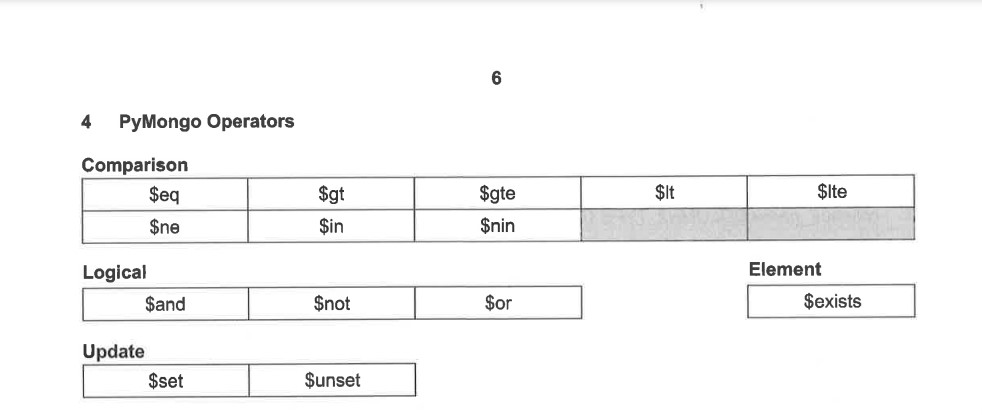
$eq: Equal to.$gt: Greater than.$in: Matches any value in the specified array.
4. Logical Query Operators
# Logical queries
for student in student_coll.find({"name": {"$not": {"$eq": "Raul"}}}):
    print(student)
Logical Operators:
$and: Joins query clauses with logical AND.$or: Joins query clauses with logical OR.$not: Inverts the effect of a query.
5. Updating Data
teacher_coll.update_many({"name": {"$exists": True}}, {"$set": {"position": "HOD"}})
Explanation:
update_one(): Updates the first document that matches the criteria.update_many(): Updates all documents that match the criteria.$set: Updates specified fields.$exists: Checks if a field exists in the document.
6. Deleting Data
teacher_coll.delete_one({"name": "Mr Lee"})
teacher_coll.drop()
Explanation:
delete_one(): Deletes the first document that matches the criteria.delete_many(): Deletes all documents that match the criteria.drop(): Removes the entire collection from the database.
7. Aggregation
teacher_coll.aggregate([
    {"$group": {"_id": "$subject", "total": {"$sum": 1}}},
    {"$sort": {"total": -1}}
])
Explanation:
$group: Groups documents by a specified field.$sum: Computes the sum of numeric values.$sort: Sorts the results in ascending or descending order.
8. Array Query Operators
student_coll.find({"hobbies": {"$type": "array"}})
Explanation:
$type: Selects documents based on the type of a field.$exists: Matches documents that contain the specified field.
9. Refering to Insert
This insert is provided during your exams and do use it only for reference